%22%3E%3Cpath%20fill%3D%22%23000%22%20d%3D%22M79.702%2078.555c0%2033.03%2018.767%2046.361%2035.801%2046.361%2014.149%200%2029.738-7.033%2034.505-28.595l-1.445-.306c-3.61%2015.903-14.005%2027.371-33.06%2027.371-13.86%200-13.716-22.173-13.716-41.594V67.415h49.662c0-23.393-13.136-40.674-35.946-40.674-17.034%200-35.801%2018.94-35.801%2051.814m35.801-50.283c14.437%200%2014.005%2026.455%2013.861%2037.617h-27.573c-.004-18.353.865-37.617%2013.712-37.617%22%2F%3E%3C%2Fg%3E%3Cmask%20id%3D%22b%22%20width%3D%22603%22%20height%3D%22126%22%20x%3D%220%22%20y%3D%220%22%20maskUnits%3D%22userSpaceOnUse%22%20style%3D%22mask-type%3Aluminance%22%3E%3Cpath%20fill%3D%22%23fff%22%20d%3D%22M602.5%200H.5v125.074h602z%22%2F%3E%3C%2Fmask%3E%3Cg%20mask%3D%22url(%23b)%22%3E%3Cpath%20fill%3D%22%23000%22%20d%3D%22M86.81%20105.474h-1.445c0%2010.547-4.475%2011.463-5.483%2011.463-2.454%200-4.475-3.514-4.475-11.921V48.264c0-14.83-10.826-21.558-22.229-21.558-10.97%200-22.66%206.118-25.983%2017.276V8.478c-.515-4.763-4.26-8.48-8.893-8.48H.522v1.53H.5c2.886%200%204.763%201.988%204.763%205.045v110.211c0%203.057-1.877%205.045-4.763%205.045h.022v1.531h31.423v-1.531h.021c-2.885%200-4.762-1.988-4.762-5.045V50.252c0-10.395%208.949-18.806%2016.31-18.806%205.338%200%209.813%204.13%209.813%2014.83v58.74c0%2013.909%207.796%2019.874%2016.165%2019.874%209.958.005%2017.318-6.418%2017.318-19.416%22%2F%3E%3C%2Fg%3E%3Cmask%20id%3D%22c%22%20width%3D%22603%22%20height%3D%22126%22%20x%3D%220%22%20y%3D%220%22%20maskUnits%3D%22userSpaceOnUse%22%20style%3D%22mask-type%3Aluminance%22%3E%3Cpath%20fill%3D%22%23fff%22%20d%3D%22M602.5%200H.5v125.074h602z%22%2F%3E%3C%2Fmask%3E%3Cg%20mask%3D%22url(%23c)%22%3E%3Cpath%20fill%3D%22%23000%22%20d%3D%22M225.911%2042.197c0-10.552-11.259-16.818-22.954-16.818-10.682%200-21.513%205.045-25.119%2016.975v-7.352c-.48-4.574-3.977-8.148-8.364-8.398h-18.322v1.53h-.022c2.886%200%204.763%201.99%204.763%205.046v81.371h.004c.293%204.814%203.942%208.633%208.509%208.846v.004h18.173v-1.53h.022c-2.886%200-4.763-1.989-4.763-5.045V48.62c0-10.552%209.094-19.269%2016.602-19.269%204.763%200%208.805%203.672%209.386%2012.693%200%206.881%204.619%2011.773%2011.119%2011.773%206.631%200%2010.966-4.587%2010.966-11.62%22%2F%3E%3C%2Fg%3E%3Cmask%20id%3D%22d%22%20width%3D%22603%22%20height%3D%22126%22%20x%3D%220%22%20y%3D%220%22%20maskUnits%3D%22userSpaceOnUse%22%20style%3D%22mask-type%3Aluminance%22%3E%3Cpath%20fill%3D%22%23fff%22%20d%3D%22M602.5%200H.5v125.074h602z%22%2F%3E%3C%2Fmask%3E%3Cg%20mask%3D%22url(%23d)%22%3E%3Cpath%20fill%3D%22%23000%22%20d%3D%22M234.434%2028.315c2.925%200%205.583%202.312%206.779%205.863l29.782%2089.218h1.597l20.61-61.852%2020.609%2061.852h1.598l29.781-89.218c1.196-3.556%203.855-5.863%206.78-5.863h.183v-1.776h-11.538v1.776h.184c2.925%200%203.99%202.312%202.794%205.863l-18.082%2054.209-18.082-54.209c-1.196-3.556-.131-5.863%202.794-5.863h.183v-1.776h-33.343v1.776h.183c2.925%200%205.583%202.312%206.78%205.863l8.373%2025.058-9.705%2029.15-18.082-54.208c-1.196-3.556-.131-5.863%202.794-5.863h.184v-1.776h-33.344v1.776z%22%2F%3E%3C%2Fg%3E%3Cmask%20id%3D%22e%22%20width%3D%22603%22%20height%3D%22126%22%20x%3D%220%22%20y%3D%220%22%20maskUnits%3D%22userSpaceOnUse%22%20style%3D%22mask-type%3Aluminance%22%3E%3Cpath%20fill%3D%22%23fff%22%20d%3D%22M602.5%200H.5v125.074h602z%22%2F%3E%3C%2Fmask%3E%3Cg%20mask%3D%22url(%23e)%22%3E%3Cpath%20fill%3D%22%23000%22%20d%3D%22M377.826%20124.491c17.034%200%2038.211-15.699%2038.211-48.882%200-33.03-21.177-48.73-38.211-48.73-17.035%200-38.067%2015.857-38.067%2048.73.004%2033.026%2021.032%2048.882%2038.067%2048.882m0-96.085c13.86%200%2016.121%2028.24%2016.121%2047.356%200%2019.116-2.261%2047.198-16.121%2047.198-13.861%200-15.978-27.777-15.978-47.198%200-19.422%202.122-47.356%2015.978-47.356%22%2F%3E%3C%2Fg%3E%3Cmask%20id%3D%22f%22%20width%3D%22603%22%20height%3D%22126%22%20x%3D%220%22%20y%3D%220%22%20maskUnits%3D%22userSpaceOnUse%22%20style%3D%22mask-type%3Aluminance%22%3E%3Cpath%20fill%3D%22%23fff%22%20d%3D%22M602.5%200H.5v125.074h602z%22%2F%3E%3C%2Fmask%3E%3Cg%20mask%3D%22url(%23f)%22%3E%3Cpath%20fill%3D%22%23000%22%20d%3D%22M490.482%2042.197c0-10.552-11.258-16.818-22.953-16.818-10.683%200-21.513%205.045-25.119%2016.975v-7.352c-.48-4.574-3.977-8.148-8.365-8.398h-18.326v1.53h-.022c2.886%200%204.763%201.99%204.763%205.046v81.371h.004c.293%204.814%203.943%208.633%208.509%208.846v.004h18.173v-1.53h.022c-2.885%200-4.763-1.989-4.763-5.045V48.62c0-10.552%209.094-19.269%2016.602-19.269%204.763%200%208.806%203.672%209.386%2012.693%200%206.881%204.619%2011.773%2011.119%2011.773%206.64%200%2010.97-4.587%2010.97-11.62%22%2F%3E%3C%2Fg%3E%3Cmask%20id%3D%22g%22%20width%3D%22603%22%20height%3D%22126%22%20x%3D%220%22%20y%3D%220%22%20maskUnits%3D%22userSpaceOnUse%22%20style%3D%22mask-type%3Aluminance%22%3E%3Cpath%20fill%3D%22%23fff%22%20d%3D%22M602.5%200H.5v125.074h602z%22%2F%3E%3C%2Fmask%3E%3Cg%20mask%3D%22url(%23g)%22%3E%3Cpath%20fill%3D%22%23000%22%20d%3D%22M602.5%20103.974h-1.445c0%2010.553-4.474%2011.468-5.483%2011.468-2.453%200-4.474-3.519-4.474-11.925V6.585c0-3.056%201.877-5.045%204.762-5.045h-.166V.01h-17.715c-4.942%200-8.953%204.24-8.962%209.475h-.009v23.333c-6.063-3.977-9.84-5.503-16.48-5.503-17.034%200-35.801%2014.169-35.801%2047.046%200%2033.183%2013.101%2050.718%2035.801%2050.718%208.085%200%2013.302-2.294%2019.942-8.254%203.03%204.587%207.797%206.575%2012.704%206.575%209.966-.004%2017.326-6.427%2017.326-19.426m-30.75%2011.625c-4.763%204.435-10.84%205.822-13.38%205.822-11.482%200-19.558-16.933-19.558-46.907%200-29.97%2010.914-43.222%2019.885-43.222%203.3%200%206.264.153%2010.307%203.057v69.172c.004%205.04%201.017%209.017%202.746%2012.078%22%2F%3E%3C%2Fg%3E%3Cmask%20id%3D%22h%22%20width%3D%22603%22%20height%3D%22126%22%20x%3D%220%22%20y%3D%220%22%20maskUnits%3D%22userSpaceOnUse%22%20style%3D%22mask-type%3Aluminance%22%3E%3Cpath%20fill%3D%22%23fff%22%20d%3D%22M602.5%200H.5v125.074h602z%22%2F%3E%3C%2Fmask%3E%3Cg%20mask%3D%22url(%23h)%22%3E%3Cpath%20fill%3D%22%23000%22%20d%3D%22M516.984%20121.865c-2.885%200-4.763-1.988-4.763-5.045V9.466C512.2%204.241%20508.196.01%20503.259.01h-17.724v1.53h-.022c2.89%200%204.763%201.989%204.763%205.045v108.418c.515%204.564%204.029%208.129%208.434%208.337v.06h18.252v-1.53h.022z%22%2F%3E%3C%2Fg%3E%3C%2Fsvg%3E)
I thought robot vacuums were overrated — until I tried Dyson’s AI version
From dodging gloss cabinets to navigating uneven HDB floors, I tested out the Dyson Spot+Scrub™ Ai Robot Vacuum Cleaner in my house for a month
By Cheryl Chan -
Share this article
It’s 2026, and the term “Artificial Intelligence” has gone from buzzword to everyday necessity.
Blink, and you’ll realise just how deeply AI has infiltrated our lives. Gemini writes our emails. Claude helps plan strategy. ChatGPT has become our therapist. If only AI could do our chores too.
Well, it seems someone at Dyson saw the memes and answered the call with the Dyson Spot+Scrub™ Ai Robot Vacuum Cleaner.
If you’ve read my past reviews, you’ll know my homeownership journey has conveniently coincided with Dyson product launches. Now that I’ve officially been a homeowner for six months, I’ve also developed a certain sense of house pride — especially when it comes to keeping the place clean.
The reality of keeping a home clean
After living in my home for six months, I was surprised by how quickly dust settles. While moving from a 750sqft to 800sqft home didn’t initially feel like a huge jump, that extra space makes a difference when you realise you’re responsible for cleaning every inch of it.
While the PencilVac and Clean+Wash Hygiene have already made my life easier, even for someone like me who enjoys a good Sunday reset, I admit that cleaning every few days gets old — fast. So I knew it was time for some assistance.
Robot vacuums aren’t exactly new (hands up if you have a Xiaomi robot somewhere in your house), but what piqued my interest was Dyson’s AI-powered approach.
Equipped with an AI-powered camera, the robot scans your home and identifies more than 200 objects, including cables, carpets, random stray socks and hidden stains. The stain detection feature was especially impressive. Instead of simply scrubbing over a stain once, the robot revisits the area multiple times, using before-and-after image processing to check whether the surface has actually been cleaned properly.
Setting up the Dyson Spot+Scrub™ Ai Robot Vacuum Cleaner
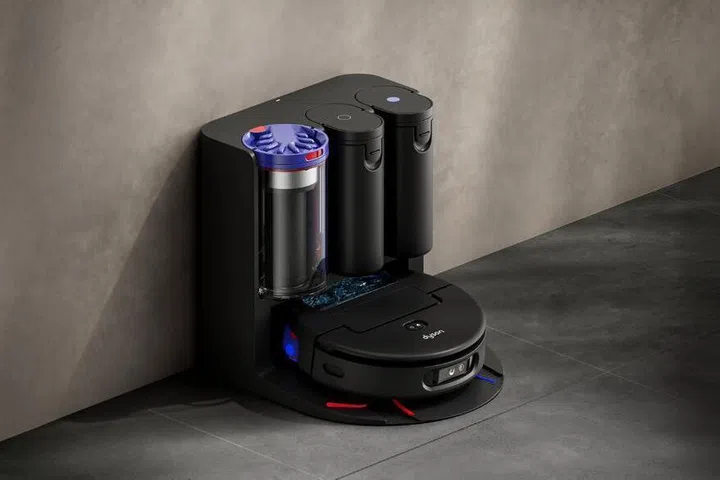
Setting up the cleaner was straightforward. Position the dock, connect it to Wi-Fi, then let the robot map out the space through the Dyson app. From there, you can create cleaning schedules, set targeted zones and customise no-go areas.
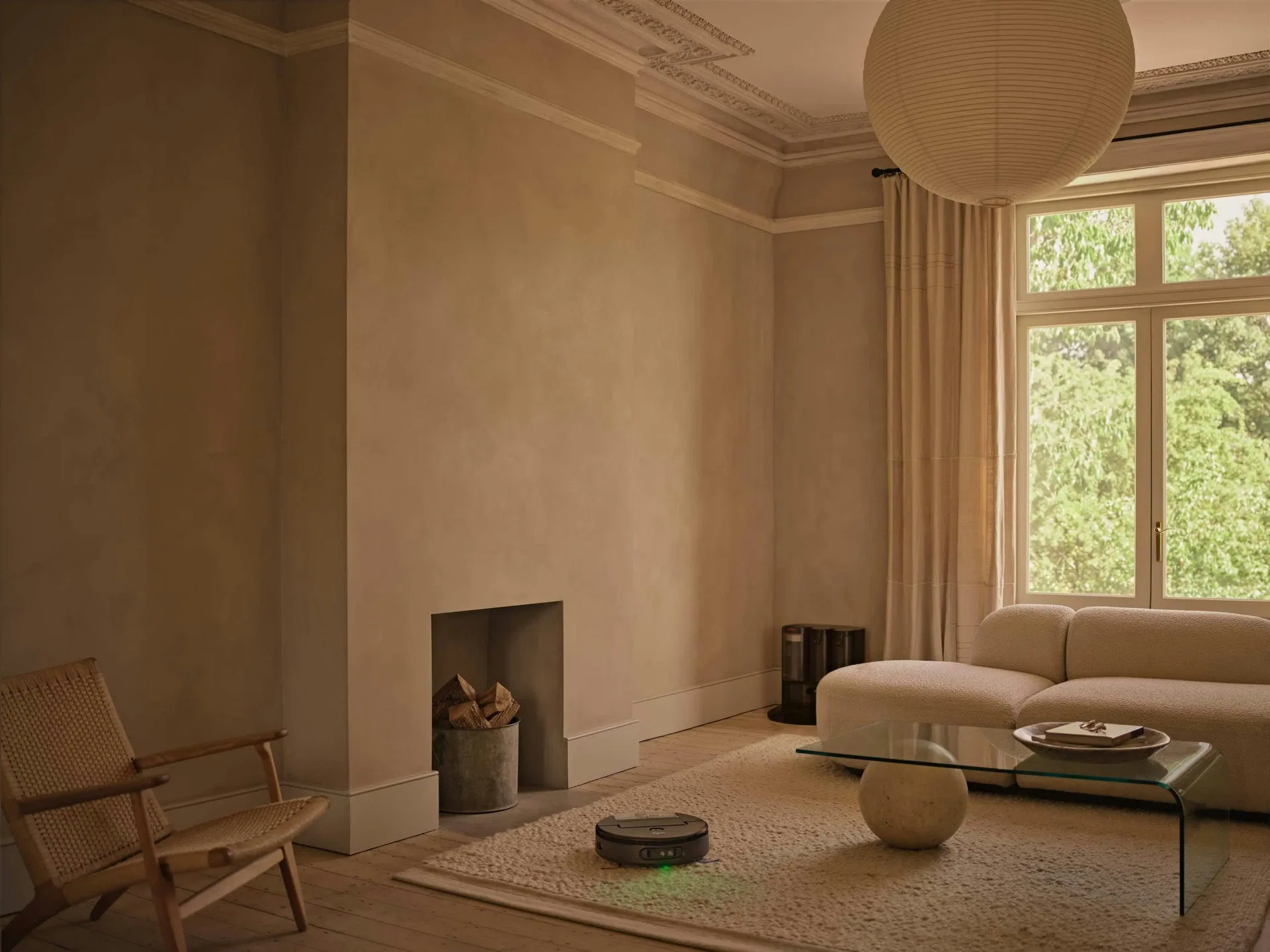
I watched as “Niffy” — my nickname for the robot — got to work. I’m far from a minimalist, so I was nervous about how it would navigate around all my furniture and clutter. My biggest concern was my glossy shoe cabinet, which scratches easily.
Thankfully, none of those worries became an issue. Niffy expertly manoeuvred around obstacles, often reversing slightly to calculate how much space it needed before cleaning around them. It even managed to crawl underneath my low armchair — an area I’d admittedly avoided cleaning out of sheer laziness. Though, to be fair, it did repeatedly bump into my small dustbin.
The biggest issue came from my home layout. My floors aren’t level, and there’s a step down into the dining and kitchen area. Since the robot can only climb thresholds of up to 2cm, it fell while attempting to map the dining space and couldn’t climb back up.
I was told the only workaround would be to move the dock to the lower dining area whenever I wanted it cleaned, which felt unnecessarily troublesome. Since I don’t have a door separating the spaces, I’ve resorted to placing a chair there as a makeshift barrier so Niffy knows not to venture down.
The dock itself is also a bit of an eyesore. Since I only received the machine after renovations were completed, I didn’t have the opportunity to plan ways to conceal it. I’ve managed to partially hide it beside my sofa, though I’m still looking for an interesting table to cover it.
Cleaning performance
Like most Dyson products, this isn’t meant to completely replace a proper deep clean that requires some elbow grease. Because of its size, there will inevitably be corners and crevices it can’t reach. And in a mature HDB flat where surfaces can be uneven, there are simply some spots no robot can properly access.
Still, I found it incredibly useful for maintenance cleaning between deeper cleans. While it can get a little noisy, I’d usually let it run while I watched TV or relaxed in my room.
I’d typically run the vacuum mode first, followed by the mop. Since I have carpets throughout the house, I was initially worried the robot would drag wet rollers across them while moving between rooms. Thankfully, its carpet fibre detection sensor retracts the wet rollers by 1cm to prevent carpets from getting wet. You can also create no-mop zones within the app for extra peace of mind.
Since my home is still relatively new, I don’t have particularly stubborn stains yet. But every time the robot returned to the dock to empty its dust and dirty water tanks, I was genuinely shocked by how much dust and grime had accumulated in such a short amount of time.
One feature I especially appreciated was how the dry debris and dirty water were separated into different containers, making the cleaning process hygienic.
Privacy first
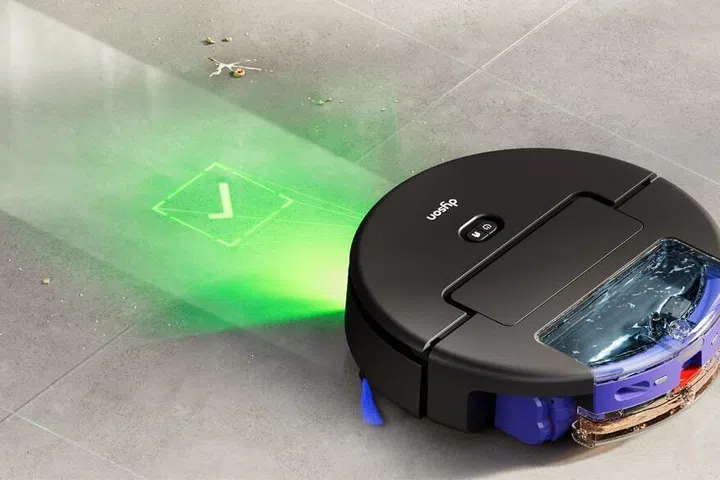
While AI is central to this machine, Dyson has clearly taken privacy seriously. The camera does not record images or videos, and any home mapping data is stored locally within the machine rather than uploaded to the cloud.
That extra layer of security feels especially important in a world increasingly filled with AI-powered devices. The last thing anyone wants is sensitive information about their home or daily habits being vulnerable to hacking or security breaches.
Overall, the Dyson Spot+Scrub™ Ai Robot Vacuum Cleaner has been a genuinely useful addition to my household. It’s convenient (save for the chair barricade I still need near my kitchen), easy to maintain and effective at what it’s designed to do.
And with a pet adoption on the horizon, I can already see myself relying on it even more in the months ahead.